



Did you know there are spy pixels in your email that might be tracking your location?
Yes, as crazy as it may sound, BBC’s investigation into Hey, an email service, discovered that over two-thirds of emails on the platform contained invisible “spy pixels.”
For those wondering what spy pixels are, these are tiny images (mostly 1×1) that are being embedded into the emails to track various data points. The use of spy pixels has become a standard in emails and has now become an “endemic.”
These tiny pixels come in a variety of forms including PNGs, or GIFs are designed in such a way to make them invisible to the naked eye.
Achieving online privacy has become very hard in today’s digital world, where companies are using unconventional methods to compromise user’s privacy. Therefore, make sure to stay up to date with the latest technology news on VPNRanks to ensure privacy and security.
How do Email Spy Pixels work?

Spy pixels are becoming quite common in emails, and not just spam mails, but all emails in general. These tracking pixels have a code embedded in them, and when an email is opened, it sends data to the company’s server. These are generally in the form of company logos, product images, etc. Some of the basic information that spy pixel can get their hands on include:
- When is the email opened?
- How many times has the email been opened
- What device has the email been opened on
- Users IP address and geolocation
Hey’s co-founder David Heinemeier says that spy pixels are a “grotesque invasion of privacy.” Unlike malicious website links, you don’t need to click or do anything to activate them as they are already embedded in the email. What’s more surprising is that according to Hey’s investigation, famous brands like Tesco, British Airways, Sainsbury’s, Marks & Spencer, and Unilever use spy pixels to get user’s data for marketing purposes.
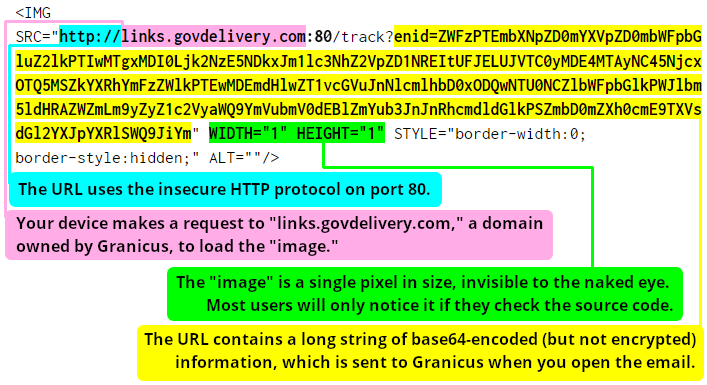
A Spy pixel identified by Electronic Frontier Foundation in an email sent to subscribers of Whitehouse.gov, a government contractor providing email services to various government agencies. [Image: EFF]
Email Spy Pixels and Invasion of Privacy
Spy pixels are a great tool for marketers; however, it’s an invasion of privacy. Companies use them in emails without the user’s knowledge. Think of email spy pixels as someone sitting outside your house in a car with binoculars to see if you are reading their emails. Now, that is downright creepy.
The problem is that these trackers are not only used by marketers but can be used by anyone in emails. These are almost invisible like plain text, and you won’t even know it’s there. By using these pixels in emails, anyone can spy on your online activities without you ever knowing.
How to Protect Yourself Against Spy Pixels?
No matter how annoying and creepy email spy pixels are, sadly they are being used for marketing purposes across all industries. But it is still an invasion of user’s online privacy; therefore, one ought to do all their power to protect themselves against such attempts. The good news is that you can block spy pixels.
Spy pixels work by loading images in your email, therefore to block them, you need to configure your email account settings to stop them from loading by default. Follow these steps below to block spy pixels in some of the most popular email clients:
Gmail on the browser:
- Log in to your Gmail account.
- Click on the Settings icon.
- Go to Settings
- Under the General tab > scroll down to the Images section.
- Select option “Ask before displaying external images.”
Android Gmail App:
- Open Gmail app
- Select your Account
- Tap Images
- Select “Ask before showing”
macOS Mail App:
- Go to Mail
- Click on Preferences > Viewing.
- Uncheck “Load remote content in messages.”
iOS Mail App:
- Go to the Settings app.
- Tap Mail
- Toggle “Load Remote Images” make sure it is OFF (white)
Microsoft Outlook
Microsoft has disabled loading images by default, but to ensure yourself, you can follow these steps:
- Open Outlook
- Select Options > Go to Trust Center.
- Click Trust Center setting
- Make sure this box is checked: “Don’t download pictures automatically in HTML email messages or RSS items.”
If you are using Chrome or Firefox, there are multiple browser extensions available that alert you in case a tracking pixel is detected in your email. Blocking remote images from downloading will protect you from email spy pixels.
Final Words
Now you know how to protect your online privacy by avoiding email spy pixels. The use of spy pixels is extremely common these days, and most of them are not being used responsibly.
Therefore, changing your email account settings or installing a plugin will protect you from tracking pixels in your email. With email extensions like Ugly Email, you will know when you are being tracked, and then you can opt not to open those emails and filter them out.
